
In the fast-paced world of modern commerce, the ability to track your stock from the palm of your hand isn’t just a luxury—it’s a competitive necessity. Whether you are an entrepreneur managing a growing e-commerce brand or a professional streamlining a warehouse, a dedicated inventory management mobile app like Stockify is the bridge between chaotic spreadsheets and organized profitability.
The demand for agility has never been higher. Traditional desktop-bound systems are being replaced by mobile-first solutions like Stockify that empower you to scan, track, and update stock levels in real-time, directly from the warehouse floor or the retail aisle.
In this comprehensive guide, we will explore why a mobile-centric approach to inventory is the future of business and how the right features—like Multi-Location Inventory Management, hierarchical organization, and integrated barcode scanning—can transform your operations.
Beyond Business: Versatile Use Cases for Stockify
Although Stockify is a force to be reckoned with when it comes to commerce, the versatility of a mobile system also enables it to address a particular problem. You might find that a Small Business Inventory Management App: Use Cases to Simplify Your Operations helps minimize overhead costs while eliminating stress.
The concepts of professional tracking apply to all aspects of your supply chain. For instance, you might find that Stockify is utilized for the complex Grocery & Perishables Inventory System that helps prevent costly waste, or that it serves as a precise tool for keeping track of commercial equipment that is taken off-site or that needs to be moved from one location to another.
Why Your Business Needs Stockify: The Modern Inventory Management Mobile App
Independent contractors and small business owners used cumbersome legacy software or manual entry for many years. These techniques lack the portability needed for contemporary logistics and are vulnerable to human error.
Stockify solves these pain points by offering:
- Data Portability: Your inventory goes where you go.
- Reduced Human Error: Barcode scanning eliminates the “typo” factor that plagues manual spreadsheets.
- Asset Security: Google Drive backups ensure your data isn’t lost if your device is damaged.
- Scalability: Start small and expand into multiple locations and thousands of SKUs without changing your workflow.
Key Feature 1: Multi-Location Inventory Management
One of the most significant challenges for growing businesses is managing stock across different physical sites. Whether you have two warehouses, three retail stores, or a fleet of service vans, you need a unified view of your assets.
The Power of “Multi-Location Inventory Management”
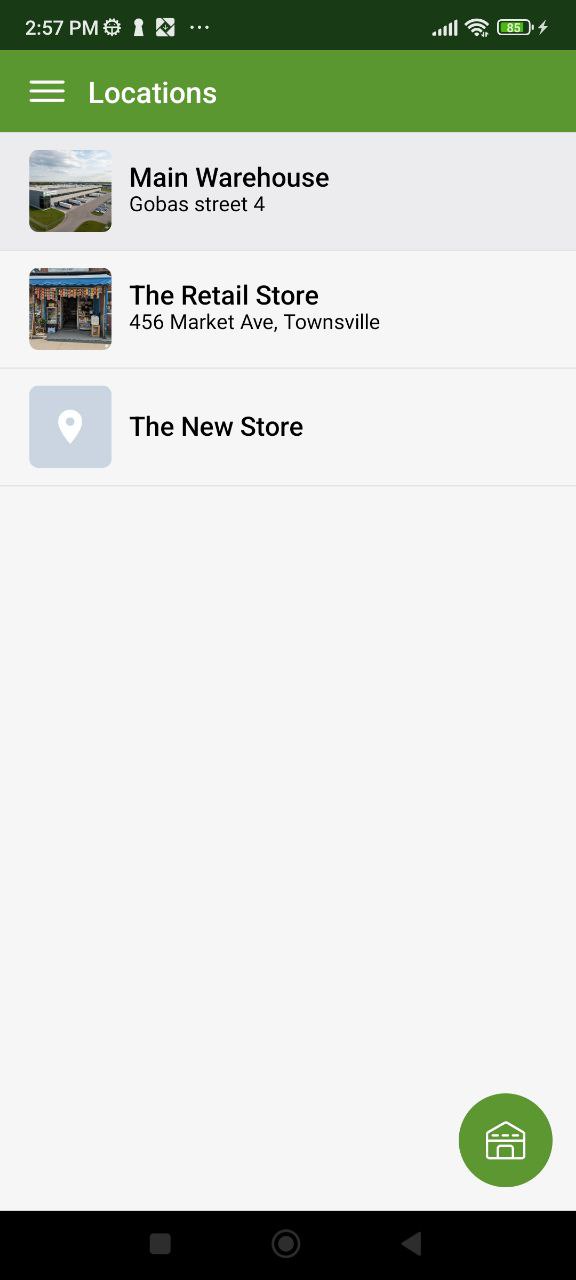
Stockify is built specifically to handle Multi-Location Inventory Management. This means you don’t just see that you have 50 units of a product; you see exactly where they are distributed across your organization.
By utilizing the centralized dashboard in Stockify, you can:
- Monitor Stock Levels by Site: Instantly check if Location A has the stock needed to cover a shortage at Location B.
- Organize Storage: Define specific spots within a location (e.g., Aisle 4, Shelf B) using our flexible location list.
- Localize Replenishment: Track which specific locations are running low on critical supplies.
Key Feature 2: Integrated Barcode & QR Scanner
Speed is the currency of modern logistics. Manually searching for a product name or SKU in a database is a relic of the past.
Turn Your Smartphone into a Powerhouse
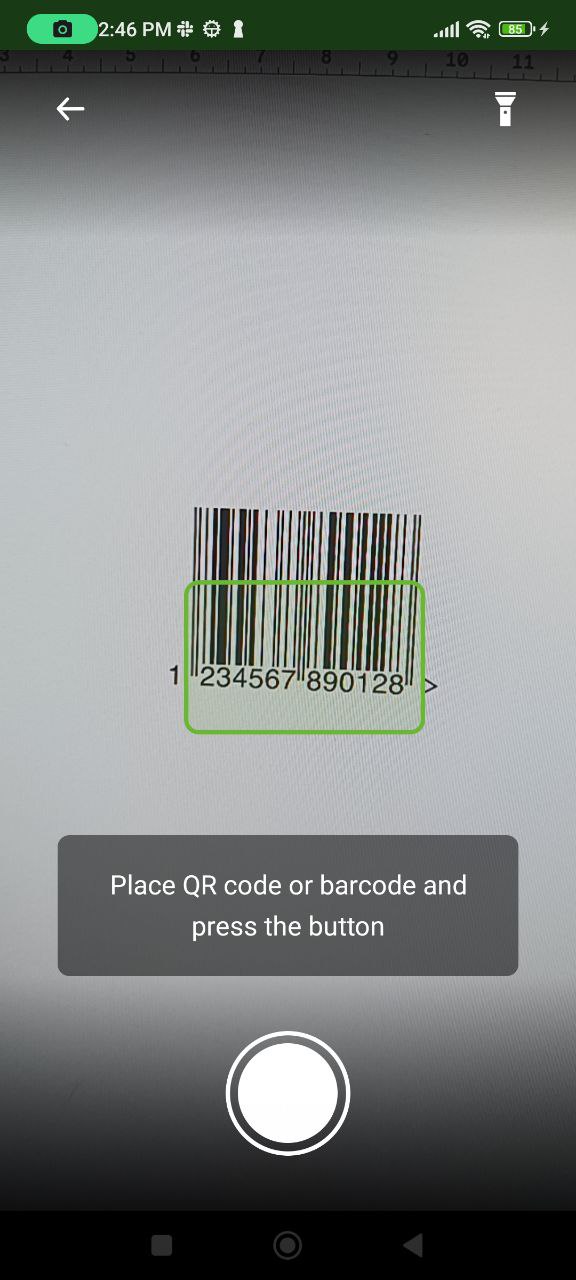
The Stockify inventory management mobile app leverages your device’s built-in camera to act as a professional-grade barcode and QR scanner. Based on the “Simple Scanner” interface, this feature is integrated into every core workflow:
- Fast Receiving: When a new shipment arrives, simply scan the items to add them to your digital inventory instantly.
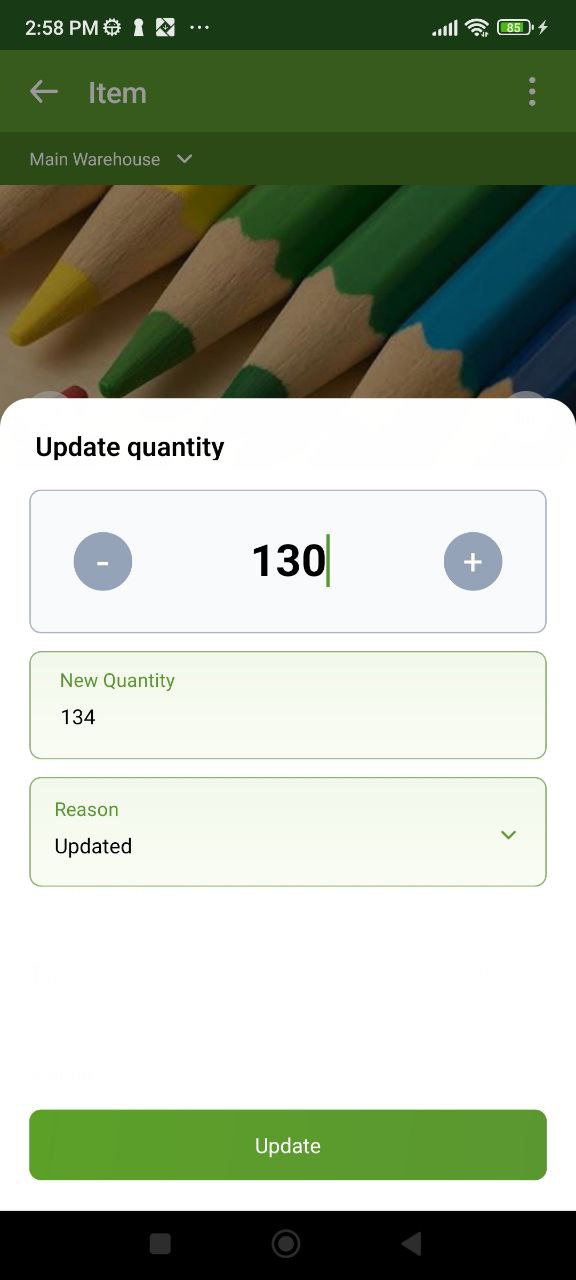
- Quick Updates: Need to change a quantity? Just scan the item, and the quantity update popup appears immediately.
- Quick Stock Takes: Monthly or weekly audits become a breeze when you can simply walk through aisles and scan barcodes to verify counts.
By removing the need for expensive external hardware, Stockify lowers the barrier to entry for high-tech inventory control.
Key Feature 3: Data Security via Google Drive Backup
We understand that your inventory data is the lifeblood of your business. You cannot afford to lose your records due to a lost phone or a technical glitch.
Reliable Backup You Control
Currently, Stockify supports seamless Google Drive Backup. This provides several key advantages:
- Full Ownership: Your data stays in your personal Google account.
- Easy Migration: If you upgrade to a new phone, simply connect your Google Drive to restore your entire inventory, including images, folders, and custom tags.
- Peace of Mind: Regular backups ensure that your historical data and current stock levels are always protected.
The Road Ahead: While Stockify currently focuses on robust individual backups via Google Drive, we are actively developing a Real-Time Team Cloud solution. This future update will allow multiple team members to sync data across different devices simultaneously, bringing enterprise-level collaboration to your pocket.
Key Feature 4: Customization, Folders, and Product Control
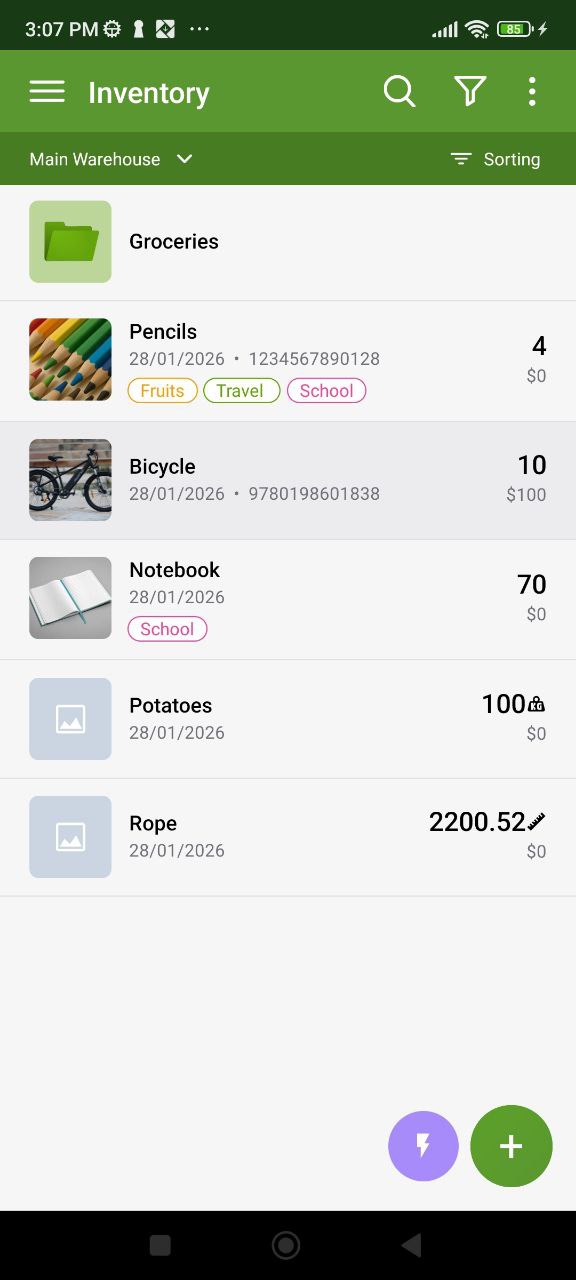
No two businesses are identical. A boutique clothing store needs to track “Fabric Type,” while a hardware supplier needs to track “Manufacturer Part Number.” Stockify provides the tools to build a bespoke system that reflects your physical warehouse structure.
Hierarchical Folders and Visual Management
Stockify lets you make Folders for Products that resemble your actual shelves or categories as your catalog expands. By doing this, you can avoid the “infinite scroll” and go directly to the appropriate department. You can quickly view product images and tags within these folders thanks to their clear, visual interface and high-density information display.
Tailoring Stockify to Your Workflow
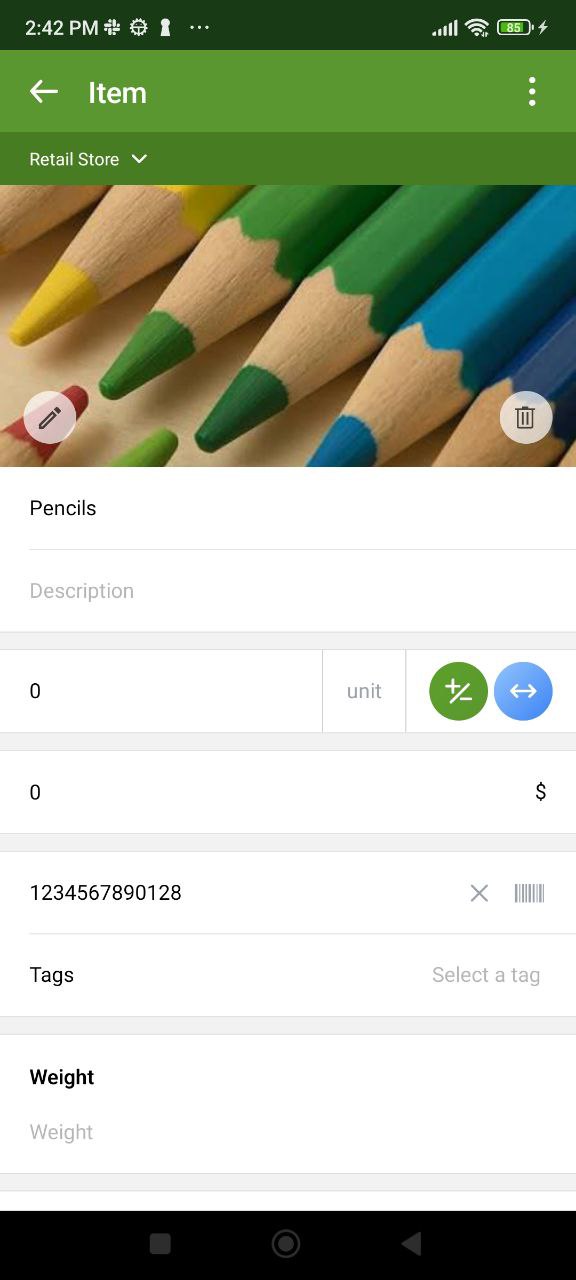
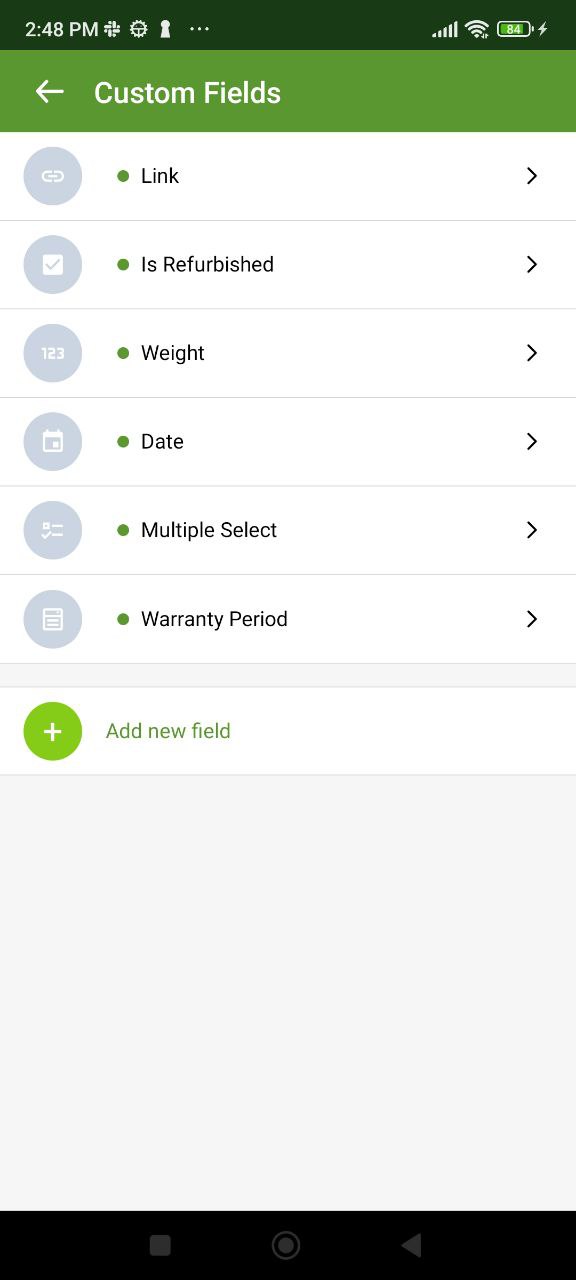
Our robust Custom Fields and Tagging system ensures you never have to compromise on the data you track.
| Feature | Best For | Benefit |
| Folders | Catalog Structure (Electronics, Apparel) | Mimics physical warehouse organization for intuitive browsing. |
| Custom Fields | Fixed data (Weight, Material, Expiry) | Standardizes data entry and improves reporting. |
| Tags | Flexible grouping (Summer Sale, Fragile) | Enables lightning-fast filtering across all locations and folders. |
| Unit Management | Packaging (Box, Pallet, Piece, Kg) | Ensures accuracy regardless of how you buy or sell. |
How to Get Started with Stockify
Transitioning to a digital system is easier than most business owners think. Here is a simple 5-step roadmap to success:
- Audit Your Current Stock: Perform a clean physical count to ensure 100% accuracy.
- Set Up Your Folder Hierarchy: Create high-level folders (e.g., “Raw Materials,” “Finished Goods”) to keep your list clean.
- Configure Multi-Location Inventory Management: Define your physical sites in the settings to track where each piece of stock resides.
- Sync to Google Drive: Enable your Google Drive backup in the settings immediately to protect your data.
- Categorize with Tags: Use the Tags feature to label items by status (e.g., “In Stock,” “Reserved”) for better filtering across folders.
Frequently Asked Questions (FAQ)
Can I move products between folders?
Yes! Stockify allows you to easily reorganize your product list by moving items from one folder to another as your categorization needs change.
Does it support QR codes or just barcodes?
The Stockify “Simple Scanner” is versatile. It supports standard UPC barcodes, EAN, and QR codes.
What happens if I lose my phone?
As long as you have enabled the Google Drive backup feature, your data—including your folder structure and Multi-Location Inventory Management settings—will be fully restored on your new device.
Conclusion: Take Control of Your Stock Today
Your inventory is your biggest asset. Stockify gives you the visibility, accuracy, and hierarchical organization to scale your business with confidence.
By mastering Multi-Location Inventory Management, utilizing folder-based organization, and securing your data through Google Drive, you are not just tracking boxes; you are optimizing your entire business.
Stop guessing and start growing. Experience the difference of Stockify, the professional inventory management mobile app designed for the modern entrepreneur.


