

Introduction
If you’ve ever stood in your storage room at 10 PM, staring at a shelf of products you swore you had in stock while a customer is waiting for a confirmation email, you know that inventory management isn’t really about “counting things.” It’s about sanity. For a small to mid-sized retail owner, the gap between “I think we have five of those” and “We actually have five of those” is where your profit margin either lives or dies.
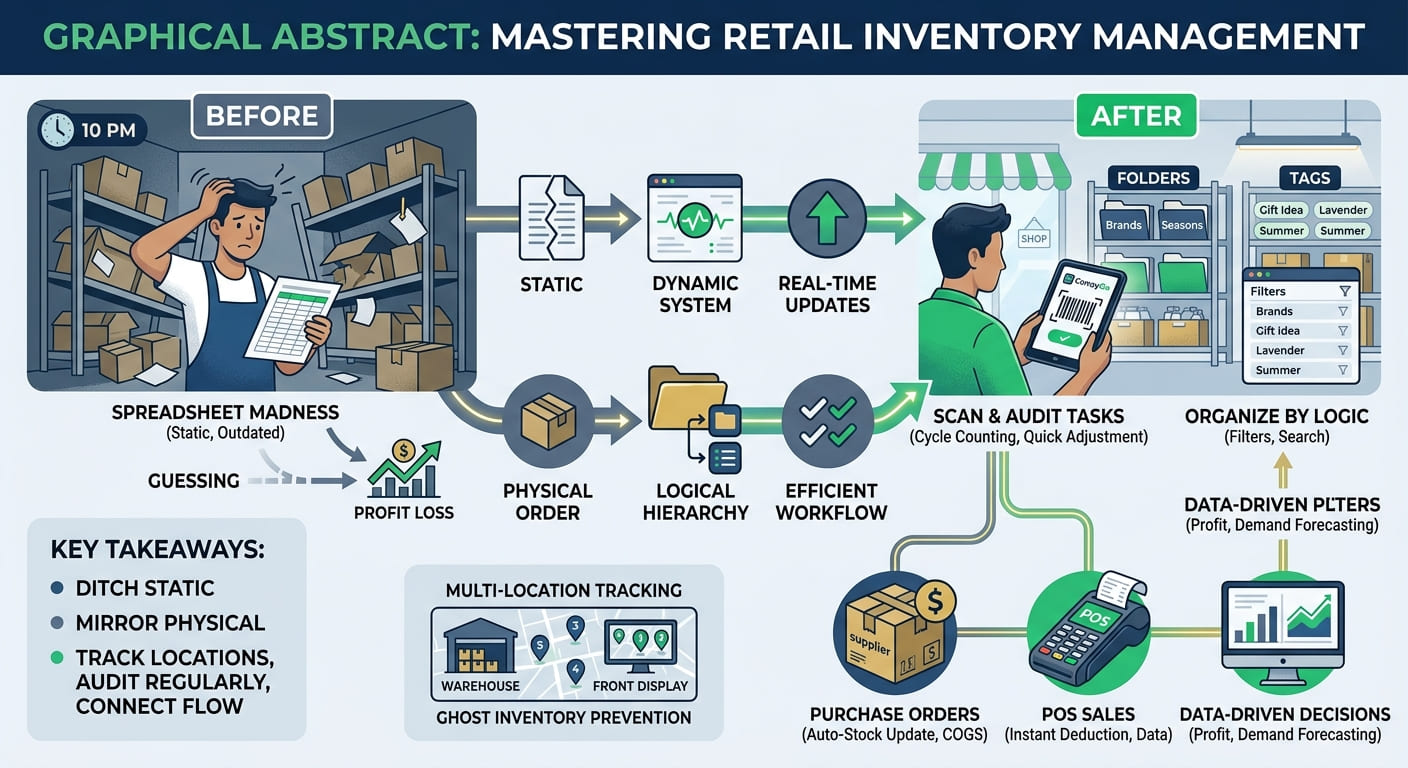
Learning how to manage retail store inventory doesn’t require a degree in supply chain logistics. It just requires a system that stops you from guessing. Whether you’re running a boutique, a hobby shop, or a growing e-commerce venture with a physical footprint, the goal is the same: have exactly what you need, when you need it, without tying up all your cash in boxes that gather dust.
Stop the Spreadsheet Madness
Most of us start with a spreadsheet. It feels organized at first—columns for product names, quantities, and prices. But spreadsheets are static, and retail is fluid. The moment you sell one item in-store and another online, your spreadsheet becomes a historical document rather than a real-time tool.
The first step in truly managing your inventory is moving toward a dynamic system. You need something that records a transaction and immediately updates your stock levels across the board. If you’re still manually typing “-1” into a cell every time a customer walks out the door, you aren’t managing inventory; you’re just documenting your losses. If you aren’t ready to switch software yet, you can learn how to manage inventory in Excel to at least maximize your current tools.
Organize by Logic, Not Just Alphabetically
A common mistake is organizing products in a way that looks good on a screen but makes no sense in a warehouse. To manage your stock efficiently, you need a hierarchy.
Think about how you actually move through your space. Instead of one giant list, use folders or categories to group items. Maybe you group by brand, or by season, or by “high-velocity” versus “slow-movers.” When your digital system mirrors your physical layout, your team spends less time searching and more time selling.
Beyond folders, use tags. Tags are the “secret sauce” for filtering. While a product can only live in one folder, it can have ten tags. A candle might be in the “Home Fragrance” folder, but tagged as “Gift Idea,” “Lavender,” and “Summer Collection.” This allows you to pull reports or lists instantly when a customer asks for “something that smells like a spa.” Learning about using tags to organize your inventory can fundamentally change how you search for items.
The Multi-Location Headache
As you grow, you might find yourself with a “back room” and a “sales floor,” or perhaps a home office and a rented storage unit. This is where things usually fall apart. If you treat your entire business as one big bucket of stock, you’ll find yourself telling a customer the item is “in stock” only to realize it’s locked in a unit three miles away.
Real inventory management requires location-specific tracking. You should be able to see exactly how many units are in “Main Storage” versus “Front Display.” When you move a box from the warehouse to the shelf, that shouldn’t be a mental note—it should be a recorded “Move” transaction.
This level of granularity prevents the “ghost inventory” phenomenon, where your system says you have one item left, but it’s actually been lost in a corner of the warehouse for six months.
Mastering the Art of the “Audit”
Even with the best software, the digital world and the physical world eventually drift apart. A bottle breaks, a customer walks out with something they didn’t pay for, or a shipment arrives with three items missing.
This is why you need a structured audit process. You don’t have to count every single screw in the bin every day, but you should implement a cycle counting routine. Pick one category a week and verify the numbers.
To make this less painful, use a smart scanner. Instead of writing a list on a clipboard and then typing it into a computer, you should be able to scan a barcode and instantly adjust the quantity. A tool like CompyGo handles this by allowing you to define “tasks”—like increasing or decreasing quantity by a set amount—and applying them in bulk via your camera. It turns a four-hour chore into a twenty-minute breeze.
Handling the “In and Out” (POS and Purchases)
Inventory doesn’t exist in a vacuum; it’s the middle point between your suppliers and your customers. If you’re tracking stock but not tracking the flow, you’re missing half the picture.
The Purchase Side
When you order from a supplier, don’t just pay the invoice and throw the packing slip in a drawer. Record the purchase. This does two things: it updates your stock levels automatically and it tracks your “cost of goods sold” (COGS). If you don’t know exactly what you paid for an item (including shipping and taxes), you can’t accurately price it for a profit.
The Sales Side
Your Point of Sale (POS) should be the heartbeat of your inventory. Every sale should trigger an immediate deduction from your stock. If you’re offering discounts or adding custom charges, these should be recorded at the line-item level. This allows you to see not just that you sold a product, but how you sold it.
Customizing the Data to Fit Your Business
Every business is different. A clothing store needs to track size and color; a pharmacy needs to track expiration dates; a hardware store might track weight or dimensions.
Generic software often forces you to cram this information into the “Notes” section, which is useless for filtering or reporting. The mark of a professional setup is the use of custom attributes. Whether it’s a checkbox for “Fragile” or a date field for “Warranty Expiry,” having dedicated fields for your specific needs means you can sort and filter your inventory based on the actual requirements of your trade.
Summary
Managing retail inventory is less about the act of counting and more about the discipline of recording. When you move from “guessing” to “knowing,” your entire business changes. You stop over-ordering items that don’t move and stop losing sales because of surprise stock-outs.
If you want to get your house in order, start here:
- Ditch the static sheets: Get a system that updates in real-time.
- Mirror your physical space: Use folders and tags to organize your digital list.
- Track locations: Stop treating your storage and your shop as one big pile.
- Audit regularly: Use a scanner to keep your digital records honest.
- Connect the flow: Link your supplier purchases and customer sales directly to your stock levels.
It takes a bit of effort to set up, but the payoff is a business that runs on data instead of stress. Once the system is in place, you can stop worrying about where your stock is and start focusing on how to sell more of it.